To help you structure your business knowledge, the Glossary module contains a number of object types. The chart at the end of this section gives a visual representation of their hierarchy.
Which objects can the Glossary hold?
- Universe: a set of logically related concepts. Universes are at the top of the Glossary hierarchy, meaning they can contain all Glossary objects, including other universes.
- Example: the name of one of your applications.
- Concept: a general idea, the abstract representation of an object, or a set of objects with common characteristics.
- Examples: a customer or a product.
- Indicator: the translation of a concept or phenomenon into a number or a signal. An Indicator group is a set of indicators.
- Example: a
color codeindicator can be nested under aproduct descriptorindicator group.
- Example: a
- Term or Business term: a basic description of reality.
- Example: a
customer IDor aproduct ID.
- Example: a
- Value or Reference data value: the individual value of a nomenclature, a piece of reference data. Multiple Values should be nested under a Reference data object, which is a nomenclature.
- Example:
madamandsircould be two separate values under acivilityReference Data.
- Example:
- Dimension: an axis of analysis, a way you can slice information. Several dimensions can be nested under a Dimension group.
- Examples: Region, Date.
The following Glossary object is different from the ones above because it is designed to enable a matrix view. Once it has been created, it can be linked to other DataGalaxy objects (not yet migrated to this Notion knowledge base).
- Domain or Business Domain: an operational process. Several domains can be nested under a Domain Group.
- Examples: HR, finance, sales, after-sales, analytics, UX, and so on.
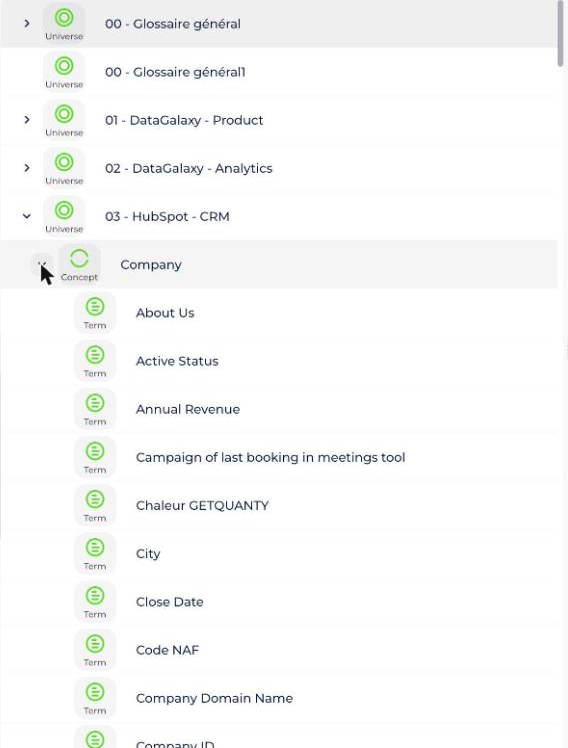
The following "Relations from the Glossary" section did not exist in the English version of this article on Freshdesk — only the French version had it. It has been translated and added here so both languages carry the same information.
Which relations start from the Glossary?
Physical links
- is implemented by: a Concept, Dimension, Indicator Group, Dimension Group, Indicator, Reference Data or Business Term is implemented by all Dictionary objects.
- is used by: a Field, Concept, Dimension, Equipment, Indicator Group, Dimension Group, Indicator, Reference Data, TagBase Source, Tag or Business Term is used by all objects in the Usage module.
Logical links
- is a domain for: a Domain is a domain for all objects in the Glossary, Dictionary, Processing or Usage modules.
- has nomenclature: a Business Term has a Reference Data for nomenclature.
- has universe: an Algorithm, Application, Field, DataSet, Dimension, Screen, FileStore, Data Flow, Feature, Dimension Group, OpenDataSet, Process, Report, Directory, Dashboard, Data Processing, Usage or View has a Universe for universe.
- breaks down: a Dimension breaks down an Indicator.
- depends on: a Concept depends on a Concept.
- is calculated by: an Indicator or Business Term is calculated by a Business Term.
- is necessary for:
- A Concept is necessary for a Concept.
- A Data Flow is necessary for a Data Flow.
- A Data Processing is necessary for a Data Processing.
- is synonymous with:
- An Indicator is synonymous with an Indicator.
- A Business Term is synonymous with a Business Term.
- A Concept is synonymous with a Concept.
- A Dimension is synonymous with a Dimension.
- is a system of record for: a Source or a Dictionary Model is a system of record for a Concept, Indicator Group, Indicator or Business Term.
- generalizes:
- A Concept generalizes a Concept.
- A Dimension generalizes a Dimension.
- An Indicator generalizes an Indicator.
- A Business Term generalizes a Business Term.
- lists the values for: a Reference Data lists the values for a Business Term.
- participates in the calculation of:
- An Indicator participates in the calculation of an Indicator.
- A Business Term participates in the calculation of an Indicator.
- groups: a Dimension groups a Concept or Business Term.
- is broken down by dimension: an Indicator is broken down by dimension by a Dimension.
- specializes:
- A Concept specializes a Concept.
- A Dimension specializes a Dimension.
- An Indicator specializes an Indicator.
- A Business Term specializes a Business Term.