You can combine metadata (DataGalaxy MCP Server) with data (a data storage MCP such as Databricks) in Cursor: find and understand assets in your catalog, then run their queries directly in your data platform.
What each MCP brings
- DataGalaxy MCP: search the catalog, get object details (names, descriptions, owners, and many more).
- Databricks MCP: execute SQL in your Databricks workspace and get result sets.
Together you can:
- Find the right asset in DataGalaxy (e.g. a data processing object or a saved query).
- Read the query or logic stored in that asset.
- Run that query in Databricks (optionally with parameters like client name, date, etc.).
- Use the results in your analysis or in follow-up prompts.
What you need first
- DataGalaxy MCP Server configured in your MCP Client (here we use Cursor) and connected to your DataGalaxy instance (with the right workspace/version).
- Databricks MCP Server (or another data storage MCP) configured and able to run SQL in your environment.
- Access to the relevant DataGalaxy workspace(s) and to the Databricks catalog/schemas used by the documented queries.
How to go from a catalogued query to live results
- Set up both MCP Servers. See the DataGalaxy MCP Server setup How to Add DataGalaxy MCP Server to Cursor. For Databricks MCP Server, follow Databricks' own instructions.
For Databricks MCP Server setup you will need:
- your Databricks MCP Server URL, in the format
https://<your-workspace-hostname>.azuredatabricks.net/api/2.0/mcp/sql
- your token: found under your profile settings → Developer → Access tokens
Screenshot: Databricks access token location. (Re-add this image here — the original Freshdesk link expires after a few days.)Databricks MCP Server setup looks like:
{ "mcpServers": { "name-mcp": { "type": "streamable-http", "url": "https://<your-workspace-hostname>/api/2.0/mcp/functions/{catalog_name}/{schema_name}", "headers": { "Authorization": "Bearer <YOUR_TOKEN>" }, "note": "Databricks SQL MCP Server" } } } - your Databricks MCP Server URL, in the format
- Search with the DataGalaxy MCP for the object that holds the logic or query you need.
Examples of what to search for:
- a data processing object (e.g. an ETL/query documented as
Find_client_id)
- a Databricks query or dataset (e.g. "Obtain customers with specific technologies")
- any asset whose description or name indicates it contains a query or a way to get client ID, list of customers, etc.
Include both the purpose and the type of object in your request, for example: "Find_client_iddata processing object," "Obtain customers with specific technologies," "query to get client id from client name." - a data processing object (e.g. an ETL/query documented as
- Retrieve the query from the asset. Once you have the object (e.g. by name and workspace), get its full details with DataGalaxy's
get_object. Many data processing and query objects store a query attribute (SQL text).
- Improve your query if needed. Ask the LLM in your MCP client (Cursor in our case) to improve, create, or modify the query.
- Execute the query in Databricks. Use the Databricks MCP to run your data search.
- Use the results. Analyze or aggregate them to get the insights you need.
Example
Our data catalog includes data processing objects with SQL queries users can use for searching information in the database:
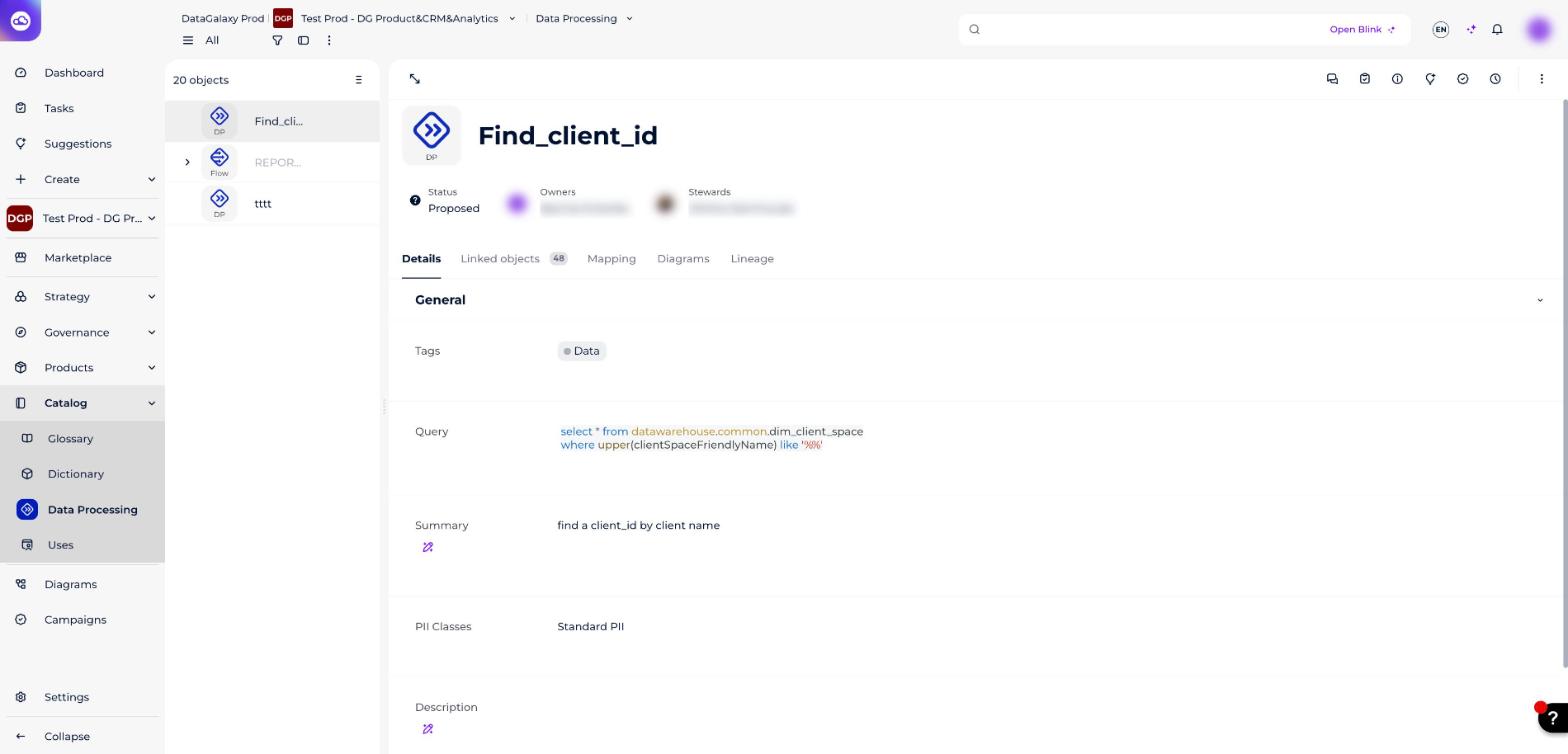
Without opening a webapp and searching there, we can ask in natural language to find this query (DataGalaxy MCP Server will assist with the search). Then, we can modify it and query the data we need, using the Databricks MCP Server.
Screenshot: finding and adapting the query via natural language. (Re-add this image here.)
Screenshot: running the adapted query through the Databricks MCP. (Re-add this image here.)
Screenshot: results returned from Databricks. (Re-add this image here.)